There’s 4 main reason for this, but only 2 of them are genuinely noticeable unless it’s a severe case of the latter reasons. Here are they by rank of likely hood. With the exception of #4 which is something that only recently, became a problem with the advent of SSD harddrives.
- Software Rot. Software rot was a term coined many years ago among developers which eventually came to public knowledge. There’s a lot of forms of software rot, but the most noticeable one is that which affects the Operating System. This is generally true for all Operating Systems. Windows has a major problem with this-which is why it’s generally a rule of thumb that heavy PC users need to reinstall windows once a year. More experienced technical users can forgo reinstalling windows, but for the average end user the Software Rot is so bad with Windows, users generally have to reinstall the operating system every year.
So what happens in Software Rot is over time so many changes occur in the software eventually bugs and performance degradation occurs. It’s why we see software and video games get worse and worse with each new release. Every time they update or patch, they change the code, leave old code behind instead of rewriting the code to remove the design flaws, and the software becomes more complex, likely to crash, and carries more useless trash over from it’s previous incarnations.
Sometimes when the user constantly changes settings, does mods or hacks, and just the general overall usage of the software causes little changes left over in settings and code to pile up. When the all these little bugs pile up over time, the software or operating system becomes unstable, bloated, and buggy.
This is the case with Operating Systems like Windows. Eventually after the user constantly adds and removes software, components, features, rolls, and settings, the garbage left behind starts to pile up creating performance penalties for the system.
Developers have really bad habits of forcing their applications to boot with the operating system in the auto run folders in both the registry and harddrive. After a year or 2, you’ll have a ton of icons in your SysTray even though you’re not using those applications.
With all those processes running it starts taking a toll on the operating systems performance making it appear like the computer has physically become slower. That’s when it’s time to reinstall. Anti-Virus software has bad habits of doing this, and between the garbage left behind by uninstalled software, auto runs, and anti-virus updates the system becomes bloated and inevitably slower.
There was an old myth back in the day of disk/platter based harddrives where overloading the harddrive and filling it up caused the computer to go slow. This was never true-until SSD’s came along. We’ll discuss SSD crowding in a bit when we get down the list, because a bloated OS means a Bloated SSD which in turn makes the system crap out prematurely performance wise-we’ll talk more on this later.
I recommend readers of this google the terms “Software Rot”, and other terms such as, “code rot, software erosion, software decay or software entropy.” to gain a deeper understanding of this very prominent software problem which has only gotten worse as coders and software companies keep lowering the bar in software development to keep up with corporate quotas, and such.
2) The next issue is heat. Overtime as we continue to user our computers, they start to collect dust and dander on their circuits, fans, and heat sinks. This is why it’s important to clean your fans and heat sinks a couple of times a year depending on how dusty your region is. It’s very hot and dusty down here in the Southern United States, so it’s good to clean your PC several times a year.
Overtime as this dust begins to build it, it both clogs up your heat sinks needed to dissipate CPU, GPU, and Chipsets, and the dust on the components create a blanket of dust which works as blanket insulating and retaining heat in the system.
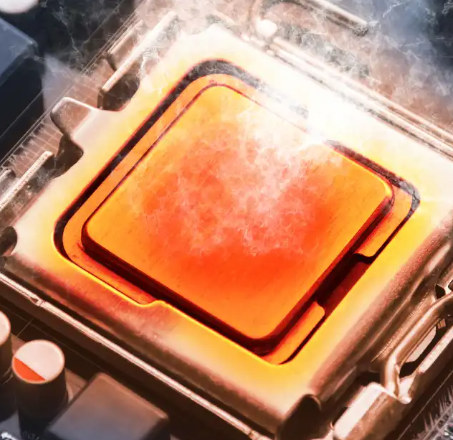
Heat is easily a 2 fold issue when it comes to computer performance. For 1, heat makes computer electronics run slower. As thermal dynamics become greater in the electronics, the applied physics makes it so electricity and signals can’t move as fast for a myriad of reasons.
-But most importantly virtually all modern computers are designed to preserve the safety of the hardware components like the CPU and GPU, and prevent them from burning up. So once the computer hits a certain temperature it automatically starts reducing voltage and clock speeds to reduce the amount of heat generated resulting in a much much slower computer.
Often times if you reinstall your operating system or clean it out, and the situation doesn’t improve, it’s because there’s a layer of dust on the system or the heat sinks are clogged forcing the computer to engage speed step or CPU/GPU power states to prevent the system from overheating and burning out the circuits.
Never turn of speed step unless you know what you’re doing and prepared to do the extra maintenance. Turning off speed step can really help speed up the system, but you need to do the follow up maintenance to keep your system safe.
3) The next situation is called simple mechanical entropy. Entropy is a major issue in moving parts. especially metallic moving parts like fans and spinning parts. Like automobiles. Well entropy also affects integrated circuits.
As man years roll by and heat abuse persists, overtime the circuits become warn down, and slow down. -But the rate of entropy for electronics and non-integrated circuits without big moving parts is much much slower than say a gas powered motor, or a PC Cooling Fan. It is non-the less present, and does affect the speed of the system as transistors and switches start to wear down.
This is generally why PC RAM goes bad over long years of usage, and why CPU’s can give out even though they’ve never been through any kind of heat abuse.
Those little transistors which are constantly flipping off and on eventually begin to wear down and can’t hold a charge as well, and the components will go through some kind of significant slow down over long periods of prolonged usage. -But unlike the previous factors, this takes much longer to take place than the aforementioned software/hardware conditions.
4) The 4TH factor I saved for last, because it’s kind of a special condition which only recently started happening.
SSD’s, especially the earlier, older, or more budget models suffer from a very particular design flaw which is not inherent to Disk/Platter based harddrives. Ass the harddrive gets full, and reaches the outer limits of it’s storage capacity something happens to the disk and slows down significantly.
Never fill an SSD to the brim, because it will severely slow down vs a fresh SSD which isn’t full to capacity. It’s actually quite a bit of a technical issue, but i recommend you google terms such as “SSD Slowdown”, and “SSD Bit Rot” with or without quotes.
I imagine the results will be similar in either case. I searched the terms without quotes, and found pertinent results right away, so give that a read to find a better understand why this garbage happens, and why I still don’t bother with standard NAND SSD drives.
SSD’s also have an issue where you can only read and write to them a limited number of times. Once you write to a cluster a certain amount of times, it breaks, and can cause severe slow down issues, data loss, and severe system crashes, so if you depend on SSD’s for performance you should always keep at the very least a USB Disk/Platter based harddrive to backup your personal data.
If possible hooking up your Disk/Platter based harddrive will provide much better performance than any USB2.0 port could possibly hope to achieve. -Whatever you can afford for a backup should serve you well in the event your SSD becomes overly crowded, or a cluster dies and takes down the whole system.
For the most part these are the main reasons a computer can appear to slow down overtime, but with good maintenance habits you can prevent most of these issues. cooling is super important, as well as making sure you uninstall garbage you don’t use, and making sure you Windows Auto Run folders in both your harddrive and registries are completely empty except for applications mandatory for your hardware to operate and function correctly.
Like applications for some wifi devices like Intel wifi, and certain keyboards and mice/touchpads like synaptic devices.
Remember, a clean computer is a fast computer.